
WASD controls launched in Ranked with patch 26.9 on April 29. Whether they're worth using depends on your role: support and top lane players get a comfortable fit with no real mechanical penalty, marksmen (ADCs) face a genuine DPS tradeoff built into the system, and jungle players lose the most to 8-directional pathing constraints. Here's what actually changed and what it means for your champion pool.
What WASD Mode Does
WASD mode replaces mouse clicks for movement. You hold directional keys to move your champion and use your mouse exclusively for aiming abilities and attacking. The two inputs are fully independent, which is the main appeal for players coming from FPS games.
The key constraint: WASD movement is 8-directional. You can move horizontally, vertically, or at 45-degree diagonals. Mouse click-to-move allows any angle. That gap matters most in the jungle, where precise pathing around walls and camps requires angles WASD can't hit cleanly, and when chasing enemies moving at non-45-degree angles.
Why Marksmen Have a Real Penalty
Riot built an attack delay into WASD to prevent it from being a straight upgrade over mouse. The mechanic is class-based, not universal:
- Melee champions: no attack delay (removed in patch V26.02)
- Non-marksman ranged champions: reduced attack delay
- Marksmen (ADCs): full attack delay, which scales with attack speed up to a cap
- Ezreal, Kai'Sa, Kindred: reduced delay despite being marksmen
The delay means your autos fire slower than optimal mouse orbwalking when you hold movement keys and attack simultaneously. Auto-attack animations also can't be cancelled by movement inputs once they begin, unlike mouse click-to-move.
There is a workaround: releasing your WASD keys just before each auto fires, then re-engaging movement afterward. This avoids the delay entirely but requires a specific rhythm that takes time to build as muscle memory. It's the equivalent of the manual stutter-step timing mouse players use when orbwalking.
Riot's data shows near win-rate parity between WASD and mouse across their testing pool, with mouse retaining a small edge. In a developer post, Riot stated the data came from players with over 1,000 games on a champion. No breakdown by role or class has been published, so the aggregate number likely masks the gap for marksmen specifically.
Which Role Should You Use WASD On?
| Role | WASD fit | Why |
|---|---|---|
| Support | Best fit | Positioning-focused; attack delay doesn't apply to most support kits |
| Top lane | Comfortable | Many top laners are melee with no delay; less reliant on kiting range |
| Mid lane | Workable | Mixed; mages have reduced delay, some assassins are melee with none |
| ADC | Lower ceiling | Marksmen have the full delay; DPS in extended kiting is lower than mouse |
| Jungle | Worst fit | 8-directional movement limits precise wall-routing and camp pathing |
For new players or anyone coming from FPS games, WASD can feel more natural than learning click-to-move from scratch. The separated movement and aim inputs also reduce hand strain, which matters for longer sessions. The accessibility benefits are the strongest case for WASD regardless of role.
Which Champions Feel Best (and Worst) on WASD
Since melee champions have no attack delay, most bruisers, tanks, and melee supports play identically on WASD and mouse in terms of DPS. The movement differences remain, but there's no DPS cost to worry about.
Among marksmen, slower-attacking champions absorb the delay more easily. Jhin, Miss Fortune, and Caitlyn are commonly cited as workable WASD picks. Their attack cadence is forgiving enough that the timing workaround is manageable.
Kalista, Jinx, Twitch, and Vayne are harder on WASD because they rely on tight orbwalk timing where the delay compounds across many rapid attacks. The higher their effective attack speed, the more the per-attack penalty adds up.
One genuinely ergonomic advantage: champions that want to move while holding aim on a skillshot, like Pyke, benefit from WASD's input separation. You can hold a movement direction with keys while your mouse stays locked on a target. It doesn't give access to angles or timings mouse can't reach, but it removes the mental split between movement and aim during hook setup.
Jungle champions that depend on precise wall-hops and curved pathing, like Lee Sin, Nidalee, and Elise, struggle with the 8-directional movement constraint regardless of the attack delay changes. The pathing limitation is the issue there, not DPS. Riot did fix a wall-pathing bug at Ranked launch (champions no longer get stuck in alcoves when the camera points away), which softens the jungle penalty slightly but doesn't change the 8-directional constraint.
These reflect community consensus from playtesting and are directional, not precise. Balance patches affect champion classifications and kits, so treat specific names as a starting point.
How to Enable WASD in League of Legends
- Open the in-game Options menu (Escape key)
- Go to the Keybinds tab
- At the top, select Keyboard (WASD) instead of Mouse (Point & Click)
- Save and close
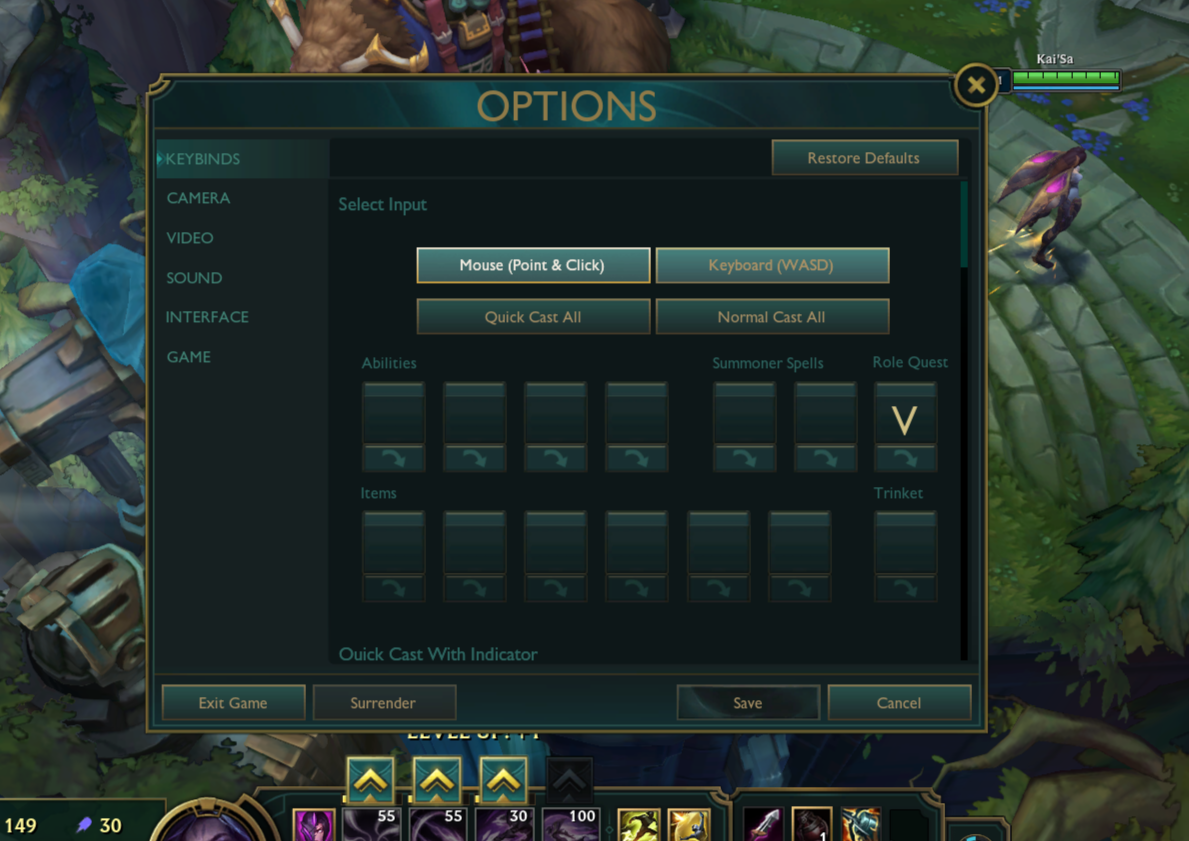
Riot recommends testing in Practice Tool before taking it to ranked. Per-champion keybind customization is available starting patch 26.8, so you can run WASD on specific champions without changing your defaults for others.
Settings Worth Configuring
Per-champion keybinds: Set different layouts per champion, including smart cast toggles. Useful for players who only want WASD on a subset of their champion pool.
Rotate WASD relative to lane orientation: Pressing W moves your champion up and to the right along the Summoner's Rift lane axis instead of straight up the screen. Reduces finger strain for players who mostly move diagonally along lanes, and helps on laptops with limited simultaneous key detection.
Discrete cast options: Auto Attack, Cast Ability, Interact, and Select Object are now individually bindable. Worth customizing if you want precise control over what each key does.
Move cursor with any input: Any key can be bound to directly move your mouse cursor. This was the most-requested accessibility feature from WASD beta testers.
Optional WASD movement is also supported in League Classic, layered on top of that mode's old-school feel. If you play support, top lane, or a melee role and have been curious about WASD, the V26.02 changes removed the main mechanical penalty for melee champions. For marksmen, the delay is real but manageable on the right champions with the timing workaround. Check the ranked settings above to configure your layout before your next game.